What is your favorite painting and drawing application for iPad? What are your thoughts on this medium for making art?
Tuesday, February 1, 2011
ArtStudio for Painting and Drawing
As many of you know, I've become quite a fan of painting and drawing on the iPad. I've mostly been experimenting with Brushes, but I stumbled upon this short video by art educator, Kevin Honeycutt, on ArtStudio. At $2.99, ArtStudio is a tad bit cheaper than Brushes ($7,99), but neither will break the bank. In my opinion, Brushes has a distinct advantage over ArtStudio in that it records the entire drawing process in the form of a video.


Thursday, January 27, 2011
Mobile Learning Group visits the Apple Store in Palo Alto
This is a long overdue post and mostly serves the purpose of archival recording of our groups experience. In early December the Apple Store on University Ave in Palo Alto hosted 8 members of our mobile learning group for a little tips, tricks, Q, and A on the iPad.Two of the store's creative staff lead this 45 minute session. A huge thank you to the Apple Store team for hosting and facilitating this learning opportunity!


Thursday, January 20, 2011
I couldn't create this with photoshop...
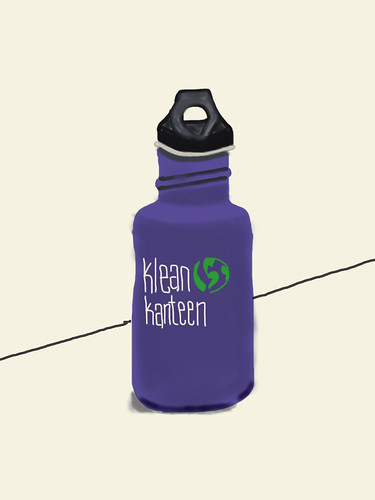 Inspired by Angelica's recent work on her iPad with brushes, I painted this picture of my water bottle last night on my iPad. As I finished I thought to myself, "There is no way I could do this with photoshop." And its true...photoshop, for me, offers far too much complexity when it comes to digital painting and drawing. I'm not saying brushes is a photoshop replacement by any means, but for me it is a superior and far easier painting and drawing program.
I contributed this photo to the Brushes iPad Art photo pool over on flickr. I'm absolutely blown away by the work by this flickr group.
A slideshow of the paintings that flickr community members have been sharing in this group is embedded below.
Wednesday, January 19, 2011
More artwork from Angelica
 Another nice painting by Angelica using her iPad. She used the brushes app to create this painting, which is the same app she used for the teddy bear.
Wednesday, January 12, 2011
Painting and Drawing on the iPad

Yet another drawing created by Angelica on her iPad. This time she used the Brushes Software program. I'm convinced that the iPad is a fantastic platform not only for content consumption, but creation as well.
Here is a little brainstorm of the advantages to painting and drawing on an iPad compared to painting and drawing with paints, brushes, paper, etc. Please note that I am not suggesting that the iPad replace the traditional media, but I do believe there are some real benefits to consider.
Advantages of painting and drawing on an iPad:
1. Some apps, like brushes, record the painting and drawing process in the form of a movie. This can be super useful in helping us remember the process...and when we remember the process, we can more easily reflect and achieve new understanding and learning. Click here to see a video recording and reflection of a drawing that I created on the iPad last fall.
2. Artists have access to a nearly unlimited set of painting and drawing tools within a drawing program like Brushes. It probably would be quite expensive to purchase all of these traditional tools for use at home, but at $7.99 in the iTunes store, Brushes gives artists access to a powerful toolset.
3. Artists have the ability to paint and draw anywhere and anytime with their iPad and they don't have to worry about toting bulky, expensive supplies and equipment with them. I could easily see some artists taking iPads into the backcountry for nature paintings and sketches-this is something not easily done with an easel, paint brushes, and a pallet.
4. With an iPad, you spend more time painting and drawing and less time involved in set up and clean up. The best way to actually learn and improve your skills is by actual engagement in the process, and the iPad allows users more time on task.
Again, I'm not saying that the iPad with apps like Brushes can fully replace traditional artistic media, but I do believe it can be a fantastic way to amplify and extend their creative interests and abilities.
Monday, January 10, 2011
e-book lending
An interesting service that aims to capitalize on the new lending feature of the Kindle (announced 12/30/10):
http://www.ebookexchange.com/index.php
According to their website, they hope to change the culture surrounding ebooks. Profits from the exchange can go toward youth literacy programs, though it looks like they are also interested in the possibility of the owner earning some money from lending out the books.
--Rebecca
http://www.ebookexchange.com/index.php
According to their website, they hope to change the culture surrounding ebooks. Profits from the exchange can go toward youth literacy programs, though it looks like they are also interested in the possibility of the owner earning some money from lending out the books.
--Rebecca
Tuesday, January 4, 2011
Thursday, December 16, 2010
A student drawing on the iPad
One of our student iPad evaluators, Angelica, recently created this drawing using AutoDesk's Sketchbook Mobile Express. She is a talented young artist and I'm glad to see her experimenting with painting and drawing in a digital medium. Angelica doesn't have a ton of traditional painting and drawing tools at home, but with the iPad she has a nearly unlimited supply of art making tools.
She is in the process of putting together her AP Art portfolio, and I hope she considers submitting some of the work she creates on the iPad.
I continue to be less interested in the iPad as a tool for doing the typical things we do with laptop computers and analogue resources like textbooks. However, I'm becoming more and more interested in the iPad as a platform to amplify creativity through art and music making programs.

She is in the process of putting together her AP Art portfolio, and I hope she considers submitting some of the work she creates on the iPad.
I continue to be less interested in the iPad as a tool for doing the typical things we do with laptop computers and analogue resources like textbooks. However, I'm becoming more and more interested in the iPad as a platform to amplify creativity through art and music making programs.

Monday, December 13, 2010
Can we justify the cost of the iPad?
When we last gathered in our user groups, I mentioned my concern for the impact of toxic waste resulting from our 21st century consumer model of mobile technology. This story raises an entirely new concern. As you will hear, more than a dozen employees of the Chinese company responsible for producing the iPad have committed suicide in recent months.
With a feverish pitch we all rush to the newest, shiny thing. Are we stopping long enough to consider the true cost to our humanity and to our planet?
by Ryanne Saddler
With a feverish pitch we all rush to the newest, shiny thing. Are we stopping long enough to consider the true cost to our humanity and to our planet?
by Ryanne Saddler
Monday, November 15, 2010
NYTimes article on hand held devices in classrooms.
Hand Held Devices Find a Place in College Classrooms
An interesting read for two reasons... While this article talks about using clicker devices made specifically for the classroom, it mentions that this can be done on the iphone/ipad. eclicker is one implementation. I didn't download this since it's $10 for the host software (it would be free for the student-side software) and I don't have students with ipads to test this out on, but interesting nonetheless.
Second reason I found this interesting is that it seems like some colleges are finally catching up with K-12 education in seeing the benefit of students being actively engaged in class (versus passively listening to a lecture). I know Arizona State has been doing this in their intro astronomy classes for years (I took a 4-day course for astronomy teachers a number of years back taught by ASU profs who did "group work" in a 150/200 student lecture class. While we don't have the challenge of teaching classes with 100 students, I could see this still having benefits for quick formative assessments and as a way to get quiet students actively participating (along with the game show novelty that shouldn't be underestimated).
Avery
Wednesday, November 10, 2010
Just getting my feet wet
As someone who has never had an ipod or any MP3 player really, I broke my unfamiliarity with podcasts by downloading and listening to one. I know, welcome to the 2000's, but this was a major milestone for me. Emboldened by my emerging technical prowess (and the gift cards) I took to the web in search of amazing apps. After getting lost a sea of sites like "the top 5 apps for history teachers", I settled on a trio of youtube videos featuring an elementary school teacher (which of course I can't find now to link). Many of his chosen apps are geared to younger kids but I did learn about and download two voice recognition apps - Dragon and PaperDesk.
-Margaret Lane
Student App Scout

Senior student and tech-wiz extraordinaire, Angelica Ortiz, is going to be doing some iPad app scouting, testing and evaluation for us over the next several months. She is a great student test user because she loves to explore and tinker with this stuff-within an hour of getting her iPad she had several apps installed.
If you see her around campus, ask her the question, "What have you learned on your iPad?" She'll also be doing periodic blog posts and videos here at our site.
Some of the apps that she likes right now include:
Draw free
YouTube
Pandora
Virtuoso piano
Mandala hang drum
iBooks (she has huck Finn and don quijote, two books she is currently reading in a couple of her classes).
-submitted by Matt Montagne
- Posted using BlogPress from my iPad
Tuesday, November 9, 2010
"The perfect two egg omelette" or, making a YouTube video on my iPhone.
After watching Tony Vincent's superb k12 online conference presentation, I was inspired to download and install the sonic pics app for iPhone. I had this crazy idea about creating an interactive multimedia library of food recipes with my advisory. As a way to "eat my own dogfood," I went ahead and created a YouTube video of the steps that I use to make my world famous two egg omelette (more craziness here of course). I am quite impressed with the ease of use and the quality of the media as it lives at YouTube.
Anyway, as it turns out, such a simple little app has value. I introduced this as an option to the juniors as they are preparing to engage in their profile projects-some students very well may decide to use iPod touch/iPhone and sonic pics to assemble and produce their learning object for this project.
Learn more about the sonic pics app for iPod touch/iPhone here. As far as a rating on the sonic pics app-I give it a 5/5 stars.
-submitted by Matt
- Posted using BlogPress from my iPad
Anyway, as it turns out, such a simple little app has value. I introduced this as an option to the juniors as they are preparing to engage in their profile projects-some students very well may decide to use iPod touch/iPhone and sonic pics to assemble and produce their learning object for this project.
Learn more about the sonic pics app for iPod touch/iPhone here. As far as a rating on the sonic pics app-I give it a 5/5 stars.
-submitted by Matt
- Posted using BlogPress from my iPad
faster than a speeding bullet
Yesterday I had my students pull out their laptops so they could give me some quick, written feedback on a new project we were experimenting with. As they sat around waiting for what felt like forever for their 'puters to boot up, I marveled at how, in contrast, my Ipad was ready for action at all times. I started to think about the video Nanci sent around of Eric Mazur (the physics prof) using technology in his big lecture classes, and found myself wondering if perhaps I should have my students keep their laptops open and available all period. Perhaps part of my daily greeting should include "saquen sus computadoras, por favor."
- Posted using BlogPress from my iPad
- Posted using BlogPress from my iPad
Monday, November 8, 2010
NaNoWriMo on an iPad
For the 6th year I am participating in NaNoWriMo (National Novel Writing Month). Writing an average of 1667 words per day to get to 50,000 in 30 days is a challenge. Technology should help with this challenge, not get in the way. I did some research into file transfers, different writing programs, and other options, and this is what I have come up with: Elements for iPad ($5) Drop box (free up to 2G storage limit), and text edit on my laptop.
Since the goal of this project is to write, write fast, not edit at all, and keep track of how many words I have written, the lack of editing ability in these programs is not important, the almost instant portability is. Elements saves everything on the iPad in dropbox. Those files are then automatically available to my laptop dropbox, or if I needed, any computer via the web. The only problem I have found so far is needing to save and close the file on the laptop before opening it on the ipad, or I might lose the new stuff. That happened once, now I am more careful. And once in a while I have had times when drop box for the iPad does not seem to update in real time, I have to open Drop Box first, to force the download. (And I can't get a word count in text edit on the laptop, but I can cut and paste into Word for a quick count, and maybe not checking my wordcount all the time is a good thing.)
Maybe I still don't have the settings right, so I am going to keep playing with it. This is not a solution for any serious editing, or for producing final versions, because of the limits of these basic editing programs. But for initial content creation, for this blog post, or anything, I can see getting addicted to this kind of connectivity.
I am also going to check out using MobleMe for similar work, once I have a few minutes to set it up. And after I finish my daily 1667 words!
- Posted using BlogPress from my iPad
Since the goal of this project is to write, write fast, not edit at all, and keep track of how many words I have written, the lack of editing ability in these programs is not important, the almost instant portability is. Elements saves everything on the iPad in dropbox. Those files are then automatically available to my laptop dropbox, or if I needed, any computer via the web. The only problem I have found so far is needing to save and close the file on the laptop before opening it on the ipad, or I might lose the new stuff. That happened once, now I am more careful. And once in a while I have had times when drop box for the iPad does not seem to update in real time, I have to open Drop Box first, to force the download. (And I can't get a word count in text edit on the laptop, but I can cut and paste into Word for a quick count, and maybe not checking my wordcount all the time is a good thing.)
Maybe I still don't have the settings right, so I am going to keep playing with it. This is not a solution for any serious editing, or for producing final versions, because of the limits of these basic editing programs. But for initial content creation, for this blog post, or anything, I can see getting addicted to this kind of connectivity.
I am also going to check out using MobleMe for similar work, once I have a few minutes to set it up. And after I finish my daily 1667 words!
- Posted using BlogPress from my iPad
Location:Menlo Park